 WA Folders
WhatsApp Web folders: tabs above your chat list
Put chats into Family, Work, Clients or whatever you need. Each folder becomes a tab, and one click shows only those chats.
Free plan with no time limit. Pro is a one-time $4.99 payment.
How folders work
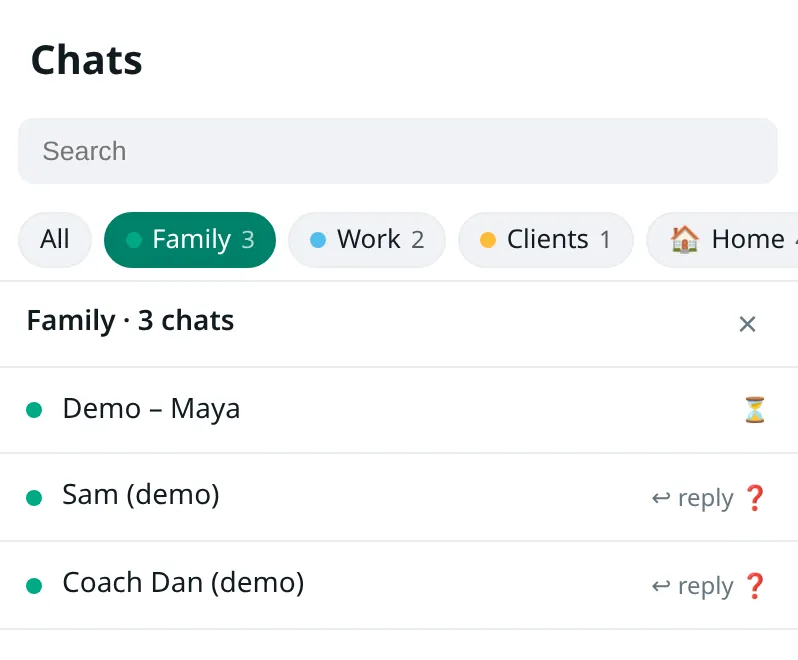
Open web.whatsapp.com with WA Folders installed. In the panel, type a folder name, pick a colour or emoji, and press Add. Open a chat and press Add chat on the folder. The folder appears as a tab above the chat list.
Each tab shows markers for unread chats, chats waiting on your reply, questions and due reminders, so you can see which folder needs you before opening it.
On first use WA Folders can suggest folders from the chat names on screen. Nothing is filed until you press Add these. Auto-file rules can put new chats into a folder by name.
Folders vs WhatsApp Lists
WhatsApp's own Lists filter chats too, and they sync to your phone. WA Folders' folders live in one Chrome profile and never show on the phone. What it adds on top: reply and question markers per folder, notes, search, export and follow-up reminders. It doesn't read or change your Lists. Full comparison.
Follow-ups that clear themselves
The Today line at the top of the panel shows what's due, who is waiting for your reply, who asked you a question, and who you're still waiting on. Waiting on them lists one-to-one chats where you spoke last. Questions for me lists chats whose last message asks you something.
Sent something and need an answer? Choose "Remind me if they don't reply in 1 day." If they answer, the reminder disappears. If not, the chat comes back under Due with a badge on the toolbar icon.
Free and Pro
The free plan includes 5 folders and 2 reminders at a time, with no time limit. Pro unlocks unlimited folders and reminders for a one-time $4.99.
A folder setup that works for most people
Start with three or four folders, not ten. The ones people use most are a personal folder (Family or Friends), a work folder, and a folder for the people who pay you (Clients, Customers, Students). A fourth catches the noisy group chats you only read on Sundays.
Pick a colour per folder. The colour dot shows in the tab and in the folder list, so you can tell at a glance which tab has the unread badge.
If you're starting from a long chat list, the guide to organizing WhatsApp Web chats into folders walks through filing the first fifty chats in about ten minutes.
What the tabs show
- All is WhatsApp's own list, unchanged. Click it to get back to normal.
- Each folder tab shows how many chats it holds and a green badge when one of them is unread.
- Inside a folder, each chat shows markers: unread, ↩ reply when the last message was theirs, and ? when it asks you something.
- Clicking a chat in a folder opens it in WhatsApp, even if it's scrolled far down the main list.
Auto-file rules and suggestions
Rules file new chats by name. A rule like "name contains Ltd → Clients" keeps a business folder up to date without you touching it. The free plan includes 1 rule; Pro has no limit.
Suggestions read only the chat names on screen and propose folders. Nothing moves until you press Add these, and you can untick anything.
Notes and the deal board
Every chat can have a private note, like "owes me $40" or "gate code 4411". Notes stay on your computer and show up in search.
For customer chats there's a deal board where you move chats between stages. The free plan holds 5 chats on the board.
What it won't do
Folders don't appear on your phone, and they don't change WhatsApp's own Lists. WA Folders never sends a message, never auto-replies and doesn't use the WhatsApp Business API. If you need team inboxes or a CRM, tools like Cooby or WAPlus do that; see the comparison page.
Related reading: how to make folders in WhatsApp Web and, on the blog, what WhatsApp's scheduled messages beta does.
Step-by-step guide: How to make folders in WhatsApp Web.
Questions
How many folders can I make for free?
5. Pro has no limit.
Do folders show on my phone?
No. They live in Chrome on your computer. Pro can sync them between your Chrome browsers, off by default.
Can a chat be in more than one folder?
Yes, add it to each folder you want.
Does WA Folders work with WhatsApp Business?
It works on WhatsApp Web, which Business accounts also use in the browser. It doesn't connect to the WhatsApp Business API.
Try it on your own chat list
Free in the Chrome Web Store. Pay once later if you want everything unlocked.