 WA Folders
How to search WhatsApp Web messages, and why some don't show up
You remember someone sent an address, a price or a tracking number, but not when or in which chat. Here is how to find it on https://web.whatsapp.com with WhatsApp's own search, what to try when that comes up empty, and what a Chrome extension I built adds on top.
Option 1: WhatsApp Web's built-in search
WhatsApp's help page "How to search WhatsApp" (Web version) describes two ways to search by keyword:
- Across your chats. Use the search box at the top of the chat list (on WhatsApp Web it reads "Search or start a new chat"), type the word or phrase, and click a result to open that message in the chat.
- Inside one chat. Open the individual or group chat, search there the same way, and click a result to jump to it. The same page also describes searching a chat by date.
On Windows, WhatsApp's keyboard shortcut list gives Ctrl+Alt+Shift+F for searching a chat.
This is the right tool most of the time, because it searches your actual messages and takes you straight to the one you want. If a message you can see on your phone doesn't turn up on WhatsApp Web, search for it on the phone.
Option 2: Local search with WA Folders
WA Folders is a Chrome extension for https://web.whatsapp.com only. It doesn't work in the phone app or the desktop app, it never sends messages, and it isn't affiliated with WhatsApp or Meta. Its search index lives in Chrome's local storage on your computer and never leaves it.
It works alongside WhatsApp's search and covers three things in one place:
- Chat names, including chats you haven't opened yet, once WA Folders has seen them in your chat list
- Your private notes on chats (notes are a WA Folders feature, so WhatsApp can't search them)
- Recent message text from chats you've opened while WA Folders was running
How the index fills up
WA Folders only reads a chat's messages after you open that chat with the extension installed. When you do, it saves the recent text of that chat, roughly the newest 3,000 characters, and updates it each time you come back. That makes it a quick index of recent conversations. It holds a chat's full history only if you use Load whole chat (Pro, below). To stay inside Chrome's storage, the index keeps message text for up to 1,200 chats, a technical limit. Past that, the chats updated longest ago lose their text first, and chats in a folder are never dropped.
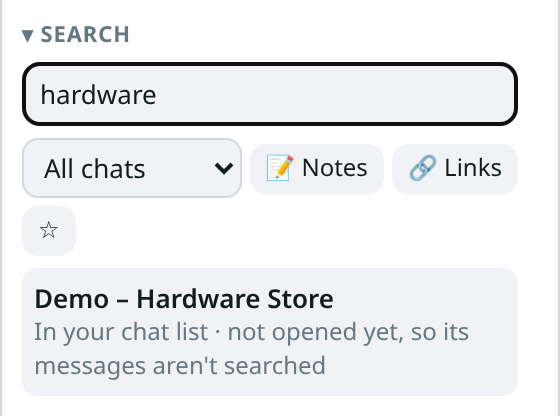
A chat you haven't opened still shows up by name if WA Folders has seen it in your chat list, with the note "In your chat list · not opened yet, so its messages aren't searched". Click it to open the chat; from then on its messages are searchable too.
Steps
- Install WA Folders: https://chromewebstore.google.com/detail/hahfpdlfieloofgjhanljbbnakinfhil?utm_source=site&utm_medium=guide
- Open https://web.whatsapp.com and open the chats you care about at least once.
- In the WA Folders panel, go to Search and type at least 2 characters in "Search chats and notes".
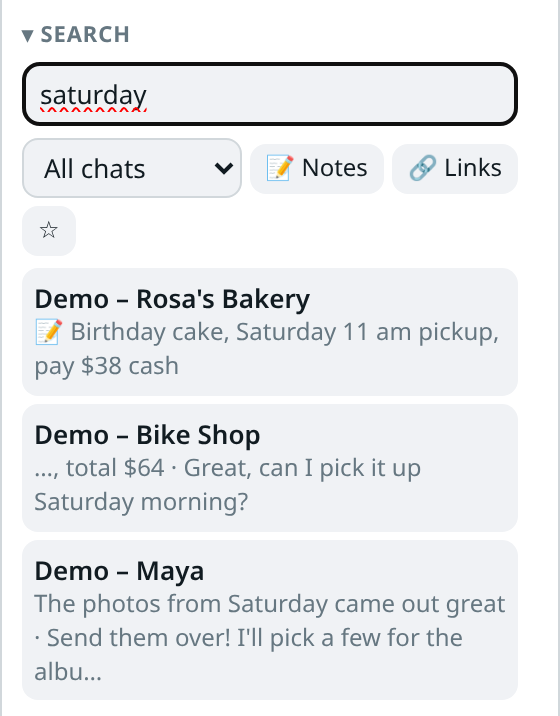
- Results show one line per chat with a short snippet around the match. Name matches come first, then notes (marked 📝), then message text.
- Click a result to open that chat. It opens the chat, not the exact message, so use WhatsApp's in-chat search and type the word again to jump to it.
If nothing matches, the panel says: "No matches in chat names on screen, chats you've opened, or notes. Scroll the chat list or open the chat once so WA Folders can find it."
Filters and saved searches
Next to the search box:
- Folder dropdown limits results to one folder, for example only Clients.
- 📝 Notes searches only your notes. With an empty search box it lists every chat that has a note.
- 🔗 Links shows only chats with a link and shows the line with the link, handy for "who sent me that form".
- ☆ saves the current search and filters. Click its star later to run it again.
Matching ignores upper and lower case but is otherwise exact, so accents and spelling count: "orcamento" won't find "orçamento".
Jump to a chat by name
If you only need to open a chat, press Ctrl+K on WhatsApp Web (or the extension shortcut Alt+Shift+K) to open the WA Folders command palette, and type part of the name of any chat WA Folders knows.
Free and Pro
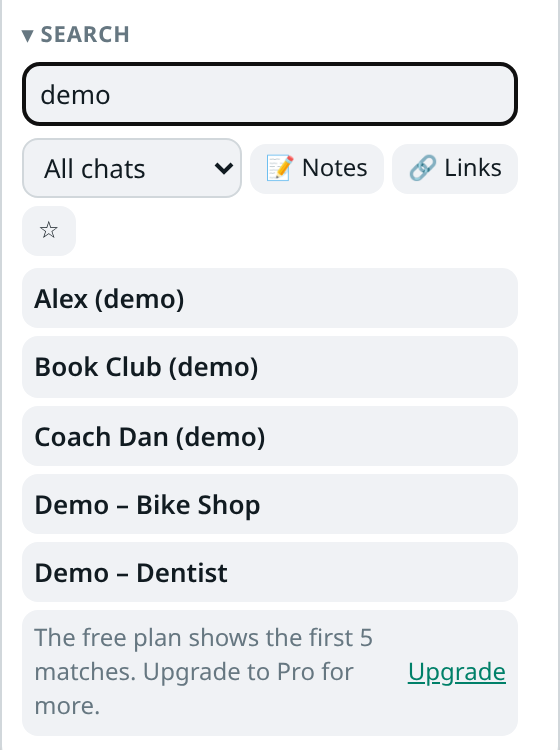
Free: search shows the first 5 matching chats, followed by "The free plan shows the first 5 matches. Upgrade to Pro for more." with an Upgrade link. You can keep 1 saved search. There's no time limit on the free plan.
Pro removes the limits for a one-time payment of $4.99.
FAQ
Why doesn't WhatsApp Web find a message I can see on my phone? WhatsApp Web may not have every older message your phone has. Search for it on the phone.
Why doesn't WA Folders find a chat I know has the word? Usually one of three things: you haven't opened that chat since installing, the message is older than the recent text WA Folders keeps for that chat, or the spelling or accents differ. On Pro, Load whole chat fixes the second one for that chat.
Does it search photos, voice notes or documents? No. It searches message text, chat names and your notes.
Where is the index stored, and can I delete it? In Chrome's local storage in your Chrome profile. Pro sync never copies it, and you can clear it with "Clear search index" in WA Folders Settings. Folders, notes and reminders stay when you do.
Related: How to export a WhatsApp Web chat, and what ends up in the file for saving a chat once you've found it, and How to make folders in WhatsApp Web for setting up folders.