 WA Folders
Search WhatsApp Web messages, notes and chats
Find the address, price or tracking number someone sent, without scrolling back for ten minutes.
Free plan with no time limit. Pro is a one-time $4.99 payment.
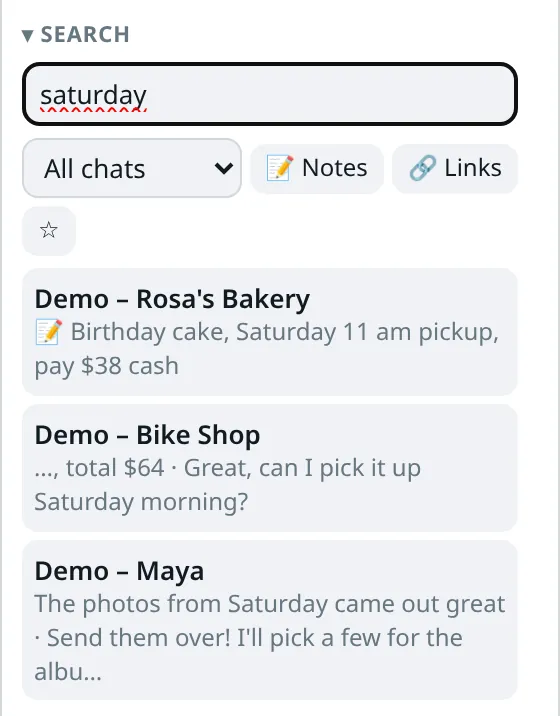
What it searches
Chat names, including chats you haven't opened yet. Your private notes. And the messages WA Folders has seen while you had chats open. Results show which chat and folder they came from, and clicking one opens the chat.
Filter by folder, by notes only, or by messages that contain links. Save a search you repeat.
Why some messages don't show up
WhatsApp Web only loads the messages you scroll to, and WA Folders indexes what has loaded. Old messages in a chat you haven't opened since installing won't be there yet. With Pro, press Load whole chat and WA Folders loads that chat's history (up to 20,000 messages) so search covers all of it.
Free and Pro
Free shows 5 results per search and 1 saved search. Pro shows every result, adds Load whole chat and unlimited saved searches, for a one-time $4.99.
Set it up in two minutes
- Install WA Folders from the Chrome Web Store and open web.whatsapp.com.
- Open the chats you search most, so their recent messages load and get indexed.
- Type in the Search box in the WA Folders panel. Results show the chat, the folder and a snippet.
- Narrow it with the folder menu, Notes or Links. Click a result to open that chat.
- Star the search if you'll run it again.
Why WhatsApp Web's own search falls short
WhatsApp Web's own search box finds chats and messages, but it can't search your own notes, it can't filter by a folder, and it gives you no way to save a search you repeat every week. It also gives no hint when a result is missing because the message never loaded on the computer.
WA Folders adds a second search box in its panel that does those things, next to WhatsApp's search rather than replacing it.
Searches people run
- An address or gate code: type a word from it. Notes are searched too, so a code you saved last month turns up.
- An invoice or tracking number: type the number. Filter by the Clients folder if the same number appears elsewhere.
- A link someone sent: turn on the Links filter to see only messages with URLs.
- Something from one person: open the folder or type their name in the search; chat names are matched too.
How the index is built
WA Folders keeps a local index of the messages it has seen in chats you opened while it was running, plus every chat name in the list and every note. The index lives in chrome.storage.local in your Chrome profile. Nothing is uploaded and there is no WA Folders server.
That's why the first day after installing, search finds fewer messages than you expect: it only knows what has loaded. Open your busy chats once, or use Load whole chat (Pro) on the ones that matter, and the index fills in.
Load whole chat (Pro)
Load whole chat scrolls a chat back to its start so every message gets indexed, up to 20,000 messages per chat. After that, search covers that chat's full history and exports can include all of it. It takes a minute on a long chat; you can keep reading other chats meanwhile.
Saved searches
Star a search to keep it with its filters. A saved "invoice" search limited to the Clients folder is one click every Monday. Free keeps 1 saved search; Pro has no limit.
More detail, including why some messages don't show up and how to fix it: the search guide. To keep a copy of what you find, see export a WhatsApp chat.
Free vs Pro for search
| Free | Pro ($4.99 once) | |
|---|---|---|
| Results per search | 5 | All |
| Saved searches | 1 | Unlimited |
| Full chat history | Loaded messages only | Load whole chat, up to 20,000 messages |
| Notes, links and folder filters | Yes | Yes |
Common problems
- No results at all: check the folder menu isn't set to an empty folder, and that Notes or Links filters are off.
- A chat is missing: chat names come from the list WhatsApp has shown on screen; scroll the list once so new chats get picked up.
- Old messages missing: open and scroll that chat, or use Load whole chat with Pro.
Step-by-step guide: How to search WhatsApp Web messages, and why some don't show up.
Questions
Is the search index uploaded anywhere?
No. It is stored in chrome.storage.local on your computer.
Does it search media?
It searches captions, labels and voice-note transcripts you made with WA Folders, not the contents of photos.
Why doesn't search find an old message?
WA Folders only indexes messages that have loaded on your computer. Open the chat, scroll back, or use Load whole chat (Pro).
Try it on your own chat list
Free in the Chrome Web Store. Pay once later if you want everything unlocked.